# Repositories
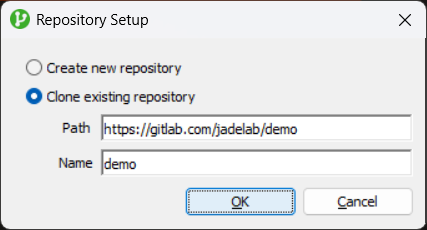
Using the Repository Setup dialog, a repository can be created or cloned. When there's no existing repositories, this is accessed via the 'Add Repository' button shown by the JadeGit Changes explorer, otherwise it's accessible via the context menu shown at the top of the explorer.
Once created or cloned, the new repository will be shown in the explorer. To the top-right, the three-dot menu provides access to various functions for managing the repository, in subsequent pages, this is referred to as the JadeGit Changes repository menu.
When creating, the [initial default branch](https://git-scm.com/docs/git-init#Documentation/git-init.txt-initdefaultBranch) is determined using your global git configuration. When cloning, the default branch of the remote repository is used.