# Create
Branches can be created from multiple contexts within JadeGit.
You can initiate branch creation from:
* The **New Branch** option in the JadeGit Changes repository menu (based on the current branch).

* The **New Local Branch** option in the context menu for a selected branch (via **Manage Branches**).\
\

* The **New Branch** option in the context menu for a selected commit (in any history view).

## Setup Branch
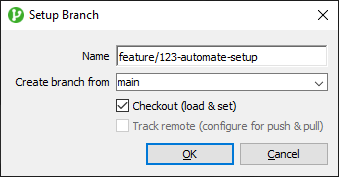
After selecting any of the branch creation options, the **Setup Branch** dialog is shown.
The **Create branch from** field shows the branch or commit the new branch will be based on. You can also enter a commit ID manually to create a branch from any commit without locating it in history.
The **Checkout (load & set)** option is selected by default to switch to the new branch immediately. The **Track remote (configure for push & pull)** option is selected by default when the branch is based on a remote branch, and disabled otherwise.