# Branches

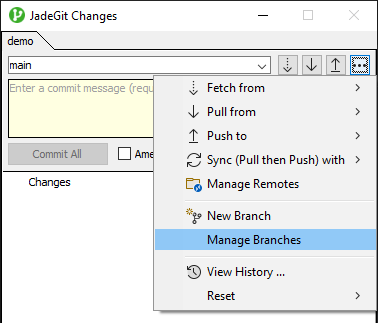
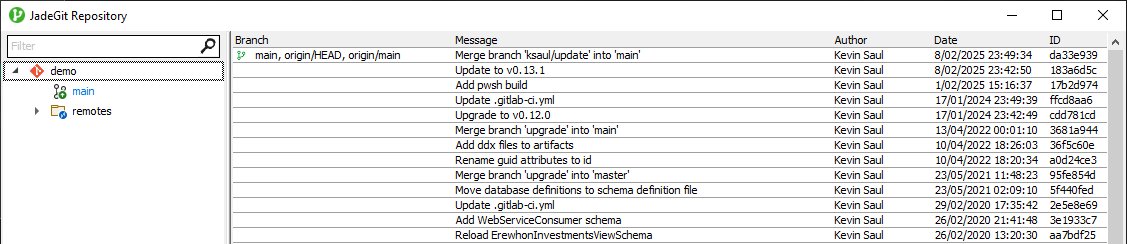
Using 'Manage Branches' from the changes explorer menu, you can open the repository window to view all branches, local & remote, which can checked out with a double-click.

<div align="center"><figure><img src="https://content.gitbook.com/content/w0jUhdQFxvrpPPdgWBb9/blobs/ZdsMCwqMMBCniAmC9QGa/image.png" alt=""><figcaption></figcaption></figure></div>

<figure><img src="https://content.gitbook.com/content/w0jUhdQFxvrpPPdgWBb9/blobs/Ibkexo0GT6KqUUrGHOEg/image.png" alt=""><figcaption></figcaption></figure>

## Setup Branch

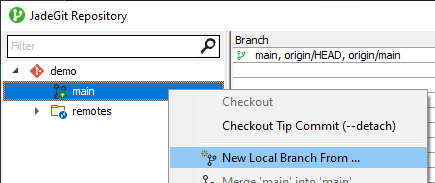
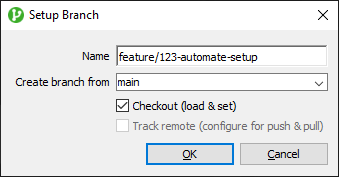
New local branches can be created from a selected branch in the repository window, or using the 'New Branch' option shown above from the changes explorer menu (from the current branch).
<div><figure><img src="https://content.gitbook.com/content/w0jUhdQFxvrpPPdgWBb9/blobs/VGqUZAbuwnNY3IV7xUph/image.png" alt=""><figcaption></figcaption></figure> <figure><img src="https://content.gitbook.com/content/w0jUhdQFxvrpPPdgWBb9/blobs/IaQk9Ucr8nbmYbV3va2H/image.png" alt=""><figcaption></figcaption></figure></div>